Creating Autotask UDF Fields
Autotask User Defined Fields (UDF) are used to house proprietary data that you have for companies, projects, etc.. This data can be used as an FYI or, in the case of Autotask WFRs and Rocketship CRM Searches, used to control business logic.
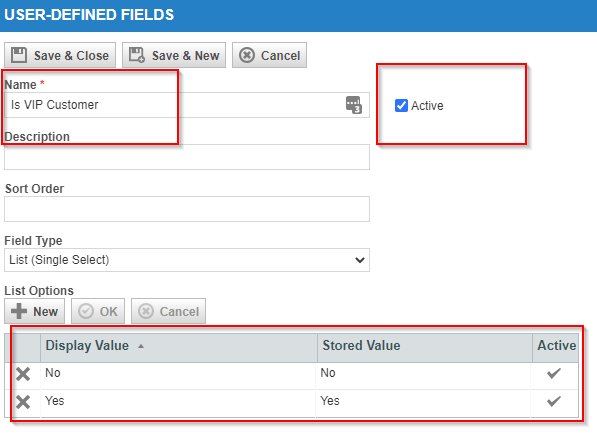
Let’s create an Autotask UDF for your Autotask Companies called “Is VIP Customer” that is either Yes or No.
- Login as an Autotask admin.
- Go to Admin->User-Defined Fields
- Click on Accounts
- Click New
- Click New
Set these fields:
- Name: Is VIP Customer
- Field Type: List (Single Select)
- Under List Options, click new
Create these two Options:
- Display Value/Stored Value: Yes (click Ok)
- Display Value/Stored Value: No (click Ok)
- Click Save & Close
Now, go find your VIP customers in Autotask CRM and then set the new UDF field “Is VIP Customer” to “Yes”.
Related Articles
Updating Autotask Ticket and Task User-Defined Fields (UDFs) via Rocketship Workflow Engine
This knowledge base article provides a comprehensive guide on how to update Autotask Ticket and Task User-Defined Fields (UDFs) using the Rocketship workflow engine. It’s essential to note that this update process is limited to modifying ...
Specifying Multiple Autotask Companies in a CRM Search
A question that comes up fairly often is “how do I create a CRM Search” in Rocketship that matches a subset of my customers? For example, you may have 500 customers, but you want a given CRM search to only find 20 of those. (Perhaps they are VIP ...
Creating a CRM Search
CRM Search is a powerful feature of Giant Rocketship. Instead of hard-coding a Process Automation or Escalation Rule against fixed criteria, you can use a CRM Search to ensure that your rules dynamically adjust to the number and types of customers ...
Creating Recurring Tickets
Every Recurring Ticket Rule has a name and is associated with a Category and Ticket Template. Note, because a Ticket Template may have multiple Recurring Rules, each rule has its own name. By creating a many-to-one relationship between Rules and ...
Fields Not Searchable by CRM Search
The Autotask API does not allow all fields to be searchable. Due to this, those fields are not available as a CRM Search parameter when configuring a new or existing CRM Search. Currently, we exclude these fields from CRM Search: Entity Field Account ...